
No products
* Prices may vary depending on your country.
* An additional contribution can be added at the time of payment.
Product successfully added to your shopping cart
There are 0 items in your cart. There is 1 item in your cart.
Product successfully added to your shopping cart
There are 0 items in your cart. There is 1 item in your cart.
New products
-
Guide Milestone/Jalon v 24
User Guide for the Milestone/Jalon module, which allows products and services to be associated with or grouped under milestones, and displays the subtotal. It is possible to add comment lines without details such as VAT, price, etc., as well as to force page breaks in commercial proposals, customer orders, customer invoices, supplier invoices, and supplier orders.
FREE -
Calibration & Equipment Pro
Manage laboratory and technical equipment, calibration schedules, maintenance, certificates, QR labels, due/overdue alerts and PDF records directly in Dolibarr.
59.00 €
DoliPortail
mp1246d20260415233212
Extend Dolibarr's native WebPortal with a client-facing product catalogue, online ordering workflow and bidirectional document sharing. Everything on your own server
|
|
More info...
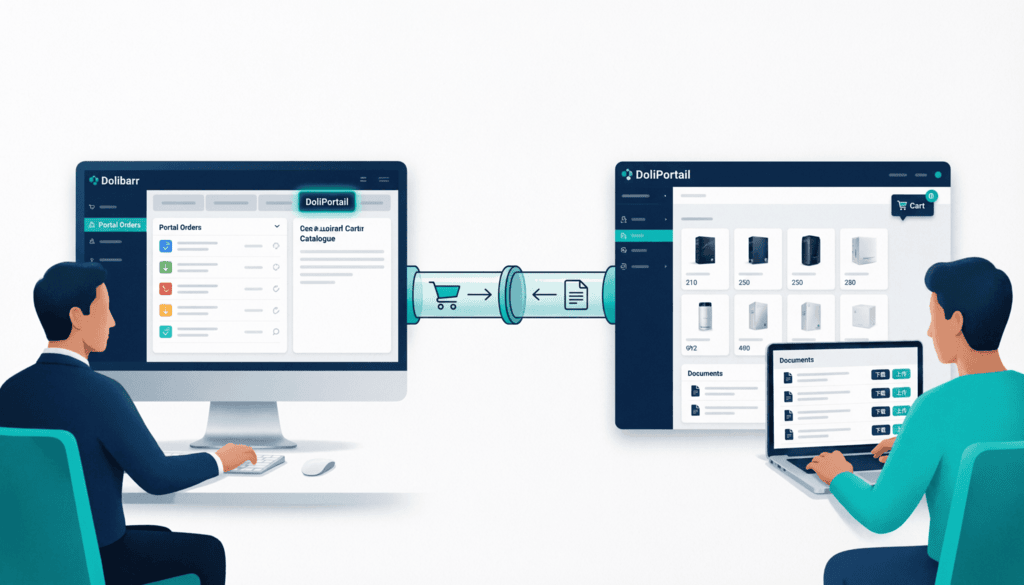
Give your clients their own space inside Dolibarr.
DoliPortail extends the native Dolibarr WebPortal with two features your clients have been waiting for: a product catalogue with online ordering and bidirectional document sharing between your team and each client. Everything runs on your server.
🛒 Product Catalogue & Online Ordering
Your clients browse your product catalogue filtered by category, view real-time prices and stock levels, add items to their cart and place orders — all from the portal. Each order is created directly in Dolibarr (llx_commande) with Draft status and tagged module_source=doliportail, ready for your team to review and validate.
- ✅ Category navigation (up to 2 levels)
- ✅ Price level per client (price_level)
- ✅ Session cart — no database overhead
- ✅ Order confirmation page (consume-once session)
- ✅ Back-office menu: Sales → Portal Orders
How the catalogue works
DoliPortail does not create a separate product database. It reads directly from your existing Dolibarr product catalogue. Exposure is controlled by a dedicated Dolibarr category named WEBPORTAL_CATALOG (configurable). Only products attached to this category — or its subcategories — are visible in the portal. Add or remove a product from the category in Dolibarr: the portal reflects it instantly. No synchronisation, no duplication, no extra maintenance.
📁 Bidirectional Document Sharing
Stop emailing files back and forth. DoliPortail gives admins and clients a shared, structured document space directly inside Dolibarr.
- ✅ Admin → Client: push contracts, quotes, invoices, T&Cs
- ✅ Admin requests → Client: ask for ID, bank details, certificates
- ✅ Client → Admin: client uploads requested files from the portal
- ✅ Full status workflow: pending → submitted → accepted / rejected
- ✅ Reject with mandatory comment, re-upload creates a new version (chained)
- ✅ Secure download via Dolibarr ECM native hash (document.php?hashp=)
- ✅ All files stored in Dolibarr's own ECM — no external storage
🗂️ DoliPortail Tab on Third-Party Cards
A dedicated tab appears on every third-party record in Dolibarr back-office. Admins manage documents, pending requests and status at a glance — upload, download, delete, reject — without leaving the client file.
How It Works
1. Install & activate → Drop in custom/doliportail/, activate WebPortal first, then DoliPortail.
2. Set up your catalogue → Create a root category named WEBPORTAL_CATALOG in Dolibarr, attach your products.
3. Enable document sharing → Go to a third-party card, open the DoliPortail tab, push a document or create a request.
4. Your client logs in → They see their catalogue, cart, orders and document inbox.
5. You validate → Draft orders appear under Sales → Portal Orders for your team to confirm.
Compatibility
| Dolibarr | Status | |
|---|---|---|
| 20.x / 21.x / 22.x | ❌ Not compatible | |
| 23.0.0 | ✅ Compatible | |
| 23.0.1 / 23.0.2 | ⚠️ Partial — WebPortal core pages affected by a known regression (#37572) | |
| 23.0.3 |
|
Requirements: PHP 7.4+ · MySQL 5.7+ / MariaDB 10.3+ · Native WebPortal module must be enabled first.
Your Data. Your Server. Your Rules.
DoliPortail installs on your own Dolibarr instance. Client orders, uploaded documents and portal activity never leave your infrastructure.
What's Coming in V2
Product variants · Min/max quantities · Invoice online payment (Stripe / PayPlug) · Outstanding balance & payment history · Automated order status notifications · Per-order messaging thread · One-click reorder
Turn Dolibarr into a real client portal.
DoliPortail: online ordering + document exchange, natively integrated into your ERP.
📧 Support: support@dzprod.net
If you think this module is a fork of another one (published after the first one) or violates some terms or conditions of use (for users or vendors), you can make a report at dolistore@dolibarr.org