
No products
* Prices may vary depending on your country.
* An additional contribution can be added at the time of payment.
Product successfully added to your shopping cart
There are 0 items in your cart. There is 1 item in your cart.
Product successfully added to your shopping cart
There are 0 items in your cart. There is 1 item in your cart.
New products
-
BOQ Workflow: Bills of Quantities, templates, signatures and customer portal for Dolibarr
Manage the Bills of Quantities (BOQ) of your construction and contracting projects in Dolibarr: reusable estimate templates, tab based BOQ form with Materials, Labours, Overhead and Signatures, quotation creation, manager signature and a customer portal where your customers view, sign and accept their BOQs and print the PDF report.
199.00 € -
NAF 2025 Transition Code
Prepare your Dolibarr data for the transition to the NAF 2025 classification, effective January 1, 2027. The NAF Code Transition module analyzes the NAF/APE codes for your French companies, automatically converts unique matches, and guides you through cases requiring a manual selection.
50.00 €
Activity : Added activity tracking widget
c718d20240322153836
This module adds widgets to Dolibarr home pages. You can choose on which dolibarr home page (home, third party, accounting, etc.) to position them.
|
|
More info...
|
Module Overview
Widget categoriesThe Activity module for Dolibarr allows you to add customizable widgets to home pages to provide in-depth visualization of activity data. These widgets can be placed on different pages, such as the general home page, customer records or accounting, thus offering flexibility adapted to user needs. |
List widgets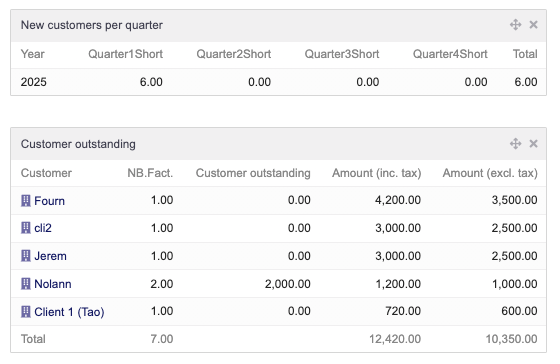
These widgets display summary tables containing essential information on commercial and financial activity. They allow you to track key indicators such as main customers and suppliers, invoicing, collection, turnover trends or new customers and members. By displaying data in the form of lists, these widgets facilitate rapid decision-making and comparative analysis of performance. |
Graphic widgets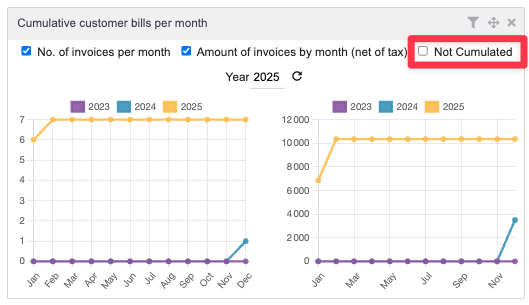
These widgets provide a visual representation of data in the form of dynamic graphs. They allow you to better understand the evolution of figures over time by displaying, for example, the amounts invoiced or collected cumulatively. The graphic aspect helps to quickly identify trends and variations in business activity. By integrating these widgets, the Activity module improves the monitoring and analysis of company performance in Dolibarr, making management more intuitive and efficient. |
Additional information presentation video
|
|
 French -
  English -
  Spanish -
  Italian -
  German
 Other modules may interest you

If you think this module is a fork of another one (published after the first one) or violates some terms or conditions of use (for users or vendors), you can make a report at dolistore@dolibarr.org