
No products
* Prices may vary depending on your country.
* An additional contribution can be added at the time of payment.
Product successfully added to your shopping cart
There are 0 items in your cart. There is 1 item in your cart.
Product successfully added to your shopping cart
There are 0 items in your cart. There is 1 item in your cart.
Categories
New products
Update prices on quotes and template invoices
mp25232d20260910125636
Bring draft proposals and template invoices back to catalogue prices, one by one or all at once, with the difference shown before you apply.
|
|
More info...
A draft proposal, or a template invoice that generates a subscription invoice every month, keeps the prices that applied on the day it was entered. When the catalogue changes, Dolibarr updates neither. For a proposal, you have to clone it with "Update prices with current known prices" and delete the original. For template invoices, you have to open each template and fix each line by hand: a hundred subscribers, a hundred templates.
New in 1.1.0: template invoices, one by one or in bulk
An Update prices button appears on every template invoice. And the screen Billing › List of templates › Update template prices lists every template with at least one line no longer at the catalogue price: the customer, the date of the next invoice, the number of lines affected, the current total, the up-to-date total and the difference. Filter by customer or product, uncheck the ones to leave out, and update them all at once. Only the next generated invoices carry the new prices: invoices already issued are never touched.
You see everything before anything is written
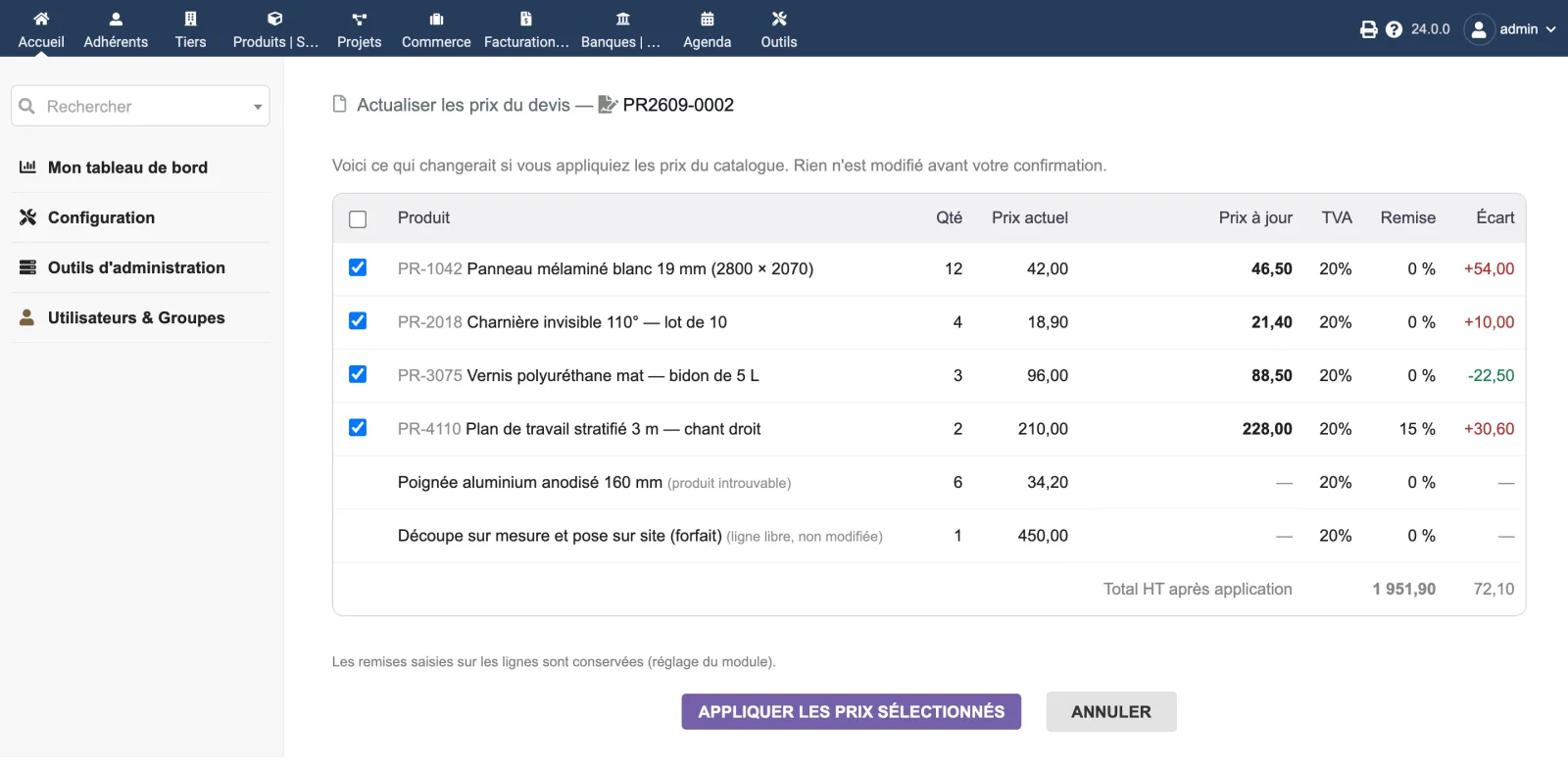
The preview shows, line by line: the current price, the catalogue price, the VAT rate, the discount and the difference. The difference includes the discount, and the total at the bottom follows the boxes you check: what is announced is exactly what will be written.
The price is Dolibarr's own
The calculation is the one Dolibarr uses when cloning a proposal with "Update prices with current known prices": base price, the customer's price level when multiprices are enabled, customer-specific price (with its validity period from Dolibarr 22).
What the module leaves alone
- Free lines without a product: their price was typed by hand. They are listed in the preview, marked as unchanged.
- Validated proposals: the button only shows on drafts.
- Orders and issued invoices: an order is a commitment, its price is agreed.
- Quantities, descriptions, dates and line extra fields.
Negotiated discounts are kept by default, unlike cloning, which replaces them with the customer's default discount. A setting allows the other behaviour.
Security: dedicated permission plus write permission on proposals or invoices; standard Dolibarr access control; an external user only sees documents of their own third party, including in the bulk screen; anti-CSRF token. Every price is recomputed on the server when applying: no price coming from the form is used.
Writes are transactional and logged. The module creates no table: disabling it leaves nothing behind.
Tested on Dolibarr 19.0.4, 20.0.4, 21.0.4, 22.0.5, 23.0.4, 24.0.1 and 24.0.2, with PHP 8.2; syntax checked with PHP 7.4, 8.3 and 8.4.
Upgrading from 1.0.0: after replacing the files, disable then re-enable the module (Dolibarr only registers the new button and menu on activation). Your settings are kept. 1.1.0 also fixes customer-specific prices with decimals or of 1,000 or more, which were misread.
Dolibarr 19 to 24, PHP 7.4 to 8.3. Commercial proposals module for proposals, Invoices module for template invoices (either one is enough).
Limitations and exclusions
- Dolibarr's quantity-based selling prices are not used: the price applied is the product's base price, the customer's price level (multiprices) or the customer-specific price.
- Interface in French, English and German; a Dolibarr in Italian or Spanish shows the module in English.
Support: included / not included
Included
- Email reply from support@dolix.fr, in French, English or German, within two working days.
- Help with installation or activation errors, behaviour that differs from this page, and questions on how to use it.
- Fixes for bugs reproduced on a Dolibarr version covered by this page, shipped in a new version of the module.
Not included
- Installation or setup done for you, training, custom development.
- Problems in Dolibarr itself or in other modules: an opinion and a lead when possible, with no commitment to a result.
- On-call service: no evening or weekend cover.
- Orders, invoices and refunds: handled by the DoliStore.
Online demo
Try the module without installing anything: demo.dolix.fr/custom/dolixprix/modeles.php. Login demo, password demo. Sample data, reset every night. The demo is in French.
If you think this module is a fork of another one (published after the first one) or violates some terms or conditions of use (for users or vendors), you can make a report at dolistore@dolibarr.org