
No products
* Prices may vary depending on your country.
* An additional contribution can be added at the time of payment.
Product successfully added to your shopping cart
There are 0 items in your cart. There is 1 item in your cart.
Product successfully added to your shopping cart
There are 0 items in your cart. There is 1 item in your cart.
Categories
New products
Move tasks between projects
mp25232d20260909225056
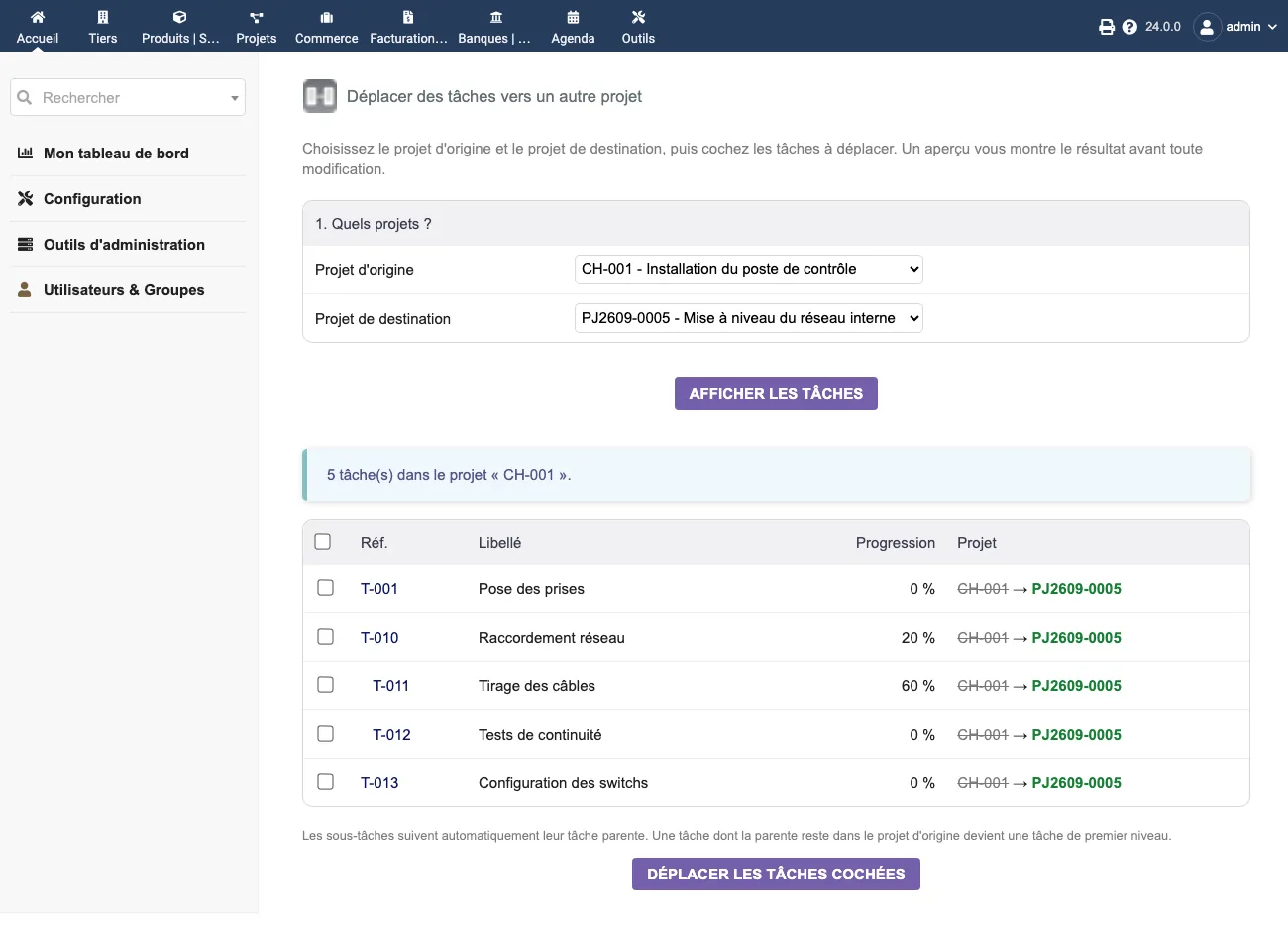
Move a task to another project with its sub-tasks, time spent and documents. Dolibarr can clone a task (and, since version 20, merge it), not move it.
|
|
More info...
Dolibarr can clone a task, but it cannot move one. A task created in the wrong project stays there: either you recreate it by hand and lose the recorded time, or you clone it and end up with a duplicate.
This module really moves it.
What follows the task
- Its sub-tasks - automatically, a sub-task never stays behind its parent
- The time spent and the assignees
- The attached documents - the folder is moved into the target project
A task whose parent stays in the source project logically becomes a top-level task.
How it works: pick the source and target projects, review the before / after preview of the whole task tree, tick what you want to move, confirm.
Safety: nothing is written before your confirmation. The move is transactional (all or nothing) and logged. The module follows Dolibarr's own visibility rules (authorised projects, external users) and is multi-company aware: a project from another entity is neither listed nor usable, even if its id is forged.
This has been an open request on the Dolibarr repository since 2022 (issue #23230). Compatible with Dolibarr V19 to V24.
Tested on Dolibarr 19.0.4, 20.0.4, 21.0.4, 22.0.5, 23.0.4, 24.0.1 and 24.0.2, with PHP 8.2; syntax checked with PHP 7.4, 8.3 and 8.4.
Limitations and exclusions
- Tasks only, from one project to another: the module does not move a project, does not merge two projects and does not change the reference of the tasks.
- Written directly to the database: Dolibarr's triggers are not run and no event is created in the agenda.
- No automatic rollback: to go back, you run the move again in the other direction. If saving fails, document folders already moved stay in the destination project.
- The module does not check that both projects belong to the same third party.
- Interface in French and English.
Support: included / not included
Included
- Email reply from support@dolix.fr, in French, English or German, within two working days.
- Help with installation or activation errors, behaviour that differs from this page, and questions on how to use it.
- Fixes for bugs reproduced on a Dolibarr version covered by this page, shipped in a new version of the module.
Not included
- Installation or setup done for you, training, custom development.
- Problems in Dolibarr itself or in other modules: an opinion and a lead when possible, with no commitment to a result.
- On-call service: no evening or weekend cover.
- Orders, invoices and refunds: handled by the DoliStore.
Online demo
Try the module without installing anything: demo.dolix.fr/custom/dolixtaches/dolixtaches.php. Login demo, password demo. Sample data, reset every night. The demo is in French.
If you think this module is a fork of another one (published after the first one) or violates some terms or conditions of use (for users or vendors), you can make a report at dolistore@dolibarr.org