
No products
* Prices may vary depending on your country.
* An additional contribution can be added at the time of payment.
Product successfully added to your shopping cart
There are 0 items in your cart. There is 1 item in your cart.
Product successfully added to your shopping cart
There are 0 items in your cart. There is 1 item in your cart.
New products
-
capcompta - Prototype of an expert interface for accountants 1.3.0
For accountants: an expert keyboard interface, at the level of dedicated accounting firm software, native to Dolibarr.
150.00 € -
Google Review Request – automatic review e-mails after each sale
Automatically e-mail your customers a Google review request a few days after each sale, from invoices or the TakePOS point of sale.
39.00 €
Dolix Caisse – TakePOS look: modern till layout and trade themes
mp25232d20261018201251
Make TakePOS look like a modern till: category tabs, large product grid, basket on the right, Charge button, trade themes or your logo colours.
|
|
More info...
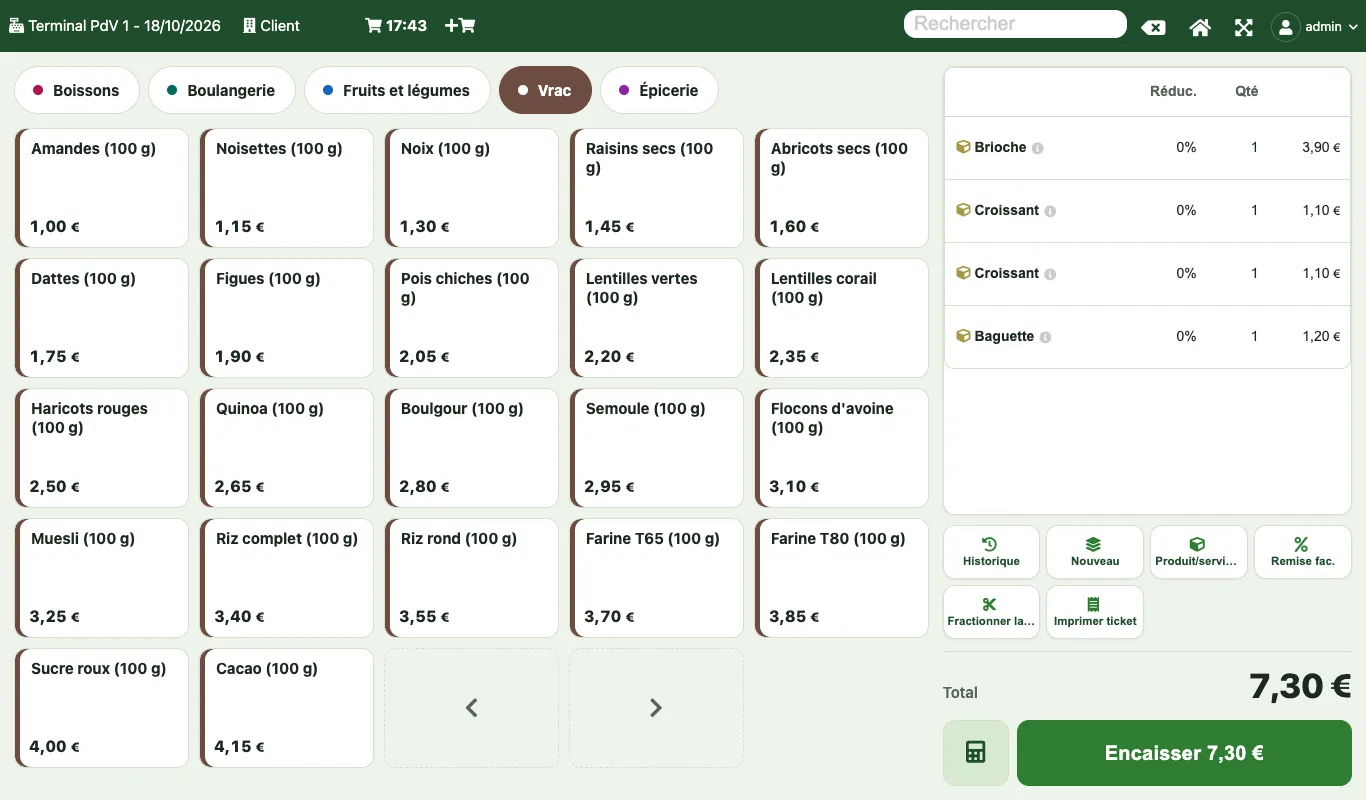
TakePOS works well, but its screen looks dated: small boxes, a crossed-out camera on every product without a picture, half of the screen empty. This module gives it the look of a modern till, without changing how it works.
Online demo
Try the module without installing anything: demo.dolix.fr/takepos/index.php. Pick a style (grocery, bakery, bar, boutique) and a layout, and the till opens with it; go back to the choice to compare. Login demo-en, password demo. Sample data, reset every night. Interface in English, data in French.
- Modern till layout: category tabs at the top, large product grid (name at the top, price at the bottom), basket on the right, full height.
- "Charge 7.30 €" button at the bottom right. It is disabled when the basket is empty, shows the remaining amount after a partial payment and becomes "New sale" once paid.
- Keypad on demand: it opens with the calculator button or when you tap a basket line (quantity, price, discount).
- 4 trade themes: Grocery, Bakery, Bar-café (dark), Boutique. Or your logo colours, picked automatically.
- Readable products without pictures: the name replaces the crossed-out camera. Each category has its colour, also shown on its products. Products with a picture keep it.
- Payment screen in the same colours.
- Bars and restaurants: the floor plan takes the same colours, with each table shown "Free" or "Occupied" at a glance. The bottom button becomes "Tables" when the basket is empty and once paid.
- Big keys (touch screens) and high contrast options.
- The original layout is still available: you can keep the TakePOS zones and only change the colours.
For whom: grocery stores, bakeries, bars, cafés and restaurants, boutiques, and any shop that sells with TakePOS on a computer or a tablet.
How it works: only the position of the zones changes. Buttons and calculations are still those of TakePOS: sales, payments, receipts and stock are recorded exactly as before. The rest of Dolibarr is unchanged.
Limits: on screens narrower than 900 px, and on the TakePOS phone screen, only the colours change. The floor plan keeps the layout of your tables: only its look changes. The payment screen and the floor plan need an up-to-date browser (Chrome, Edge, Safari or Firefox from 2024 or later); otherwise they keep their original look.
No table created, no core file modified, no outside connection. Setup is for administrators only. Tested in the browser on every Dolibarr version from 19 to 24: complete sales up to the paid receipt, Bar Restaurant mode included. Interface in French, English, German and Spanish. Written and tested by Dolix (dolix.fr).
Support
- Email reply from support@dolix.fr, in French, English, German or Spanish, within two working days; reproduced bugs are fixed in a new version of the module.
- Installation or setup done for you, training, custom development: on quotation.
Dolix also contributes to Dolibarr itself: more than 20 fixes accepted into the Dolibarr core (versions 23 and 24).
License: GPL v3 or later.
Documentation (installation, settings, FAQ, version history): dolix.fr/en/modules/habillage-takepos
If you think this module is a fork of another one (published after the first one) or violates some terms or conditions of use (for users or vendors), you can make a report at dolistore@dolibarr.org