
No products
* Prices may vary depending on your country.
* An additional contribution can be added at the time of payment.
Product successfully added to your shopping cart
There are 0 items in your cart. There is 1 item in your cart.
Product successfully added to your shopping cart
There are 0 items in your cart. There is 1 item in your cart.
New products
-
Automatic payment reminders and dunning — DunningFlow
Automate payment reminders for unpaid invoices in Dolibarr: group emails by customer and track promises to pay, disputes and payment plans. Customers can view their account and reply through the included portal.
99.00 € -
PRISME – Shared Dolibarr calendar: meetings, events, appointments, multi-company
All your organization’s key dates in one calendar: REGISTRA events, CONVOCA meetings, DOMINIUM co-owner meetings and your own appointments, read live with no double entry. Link appointments to third parties and contacts, find them in the Dolibarr Agenda and follow upcoming events from the home page. Multi-company ready: the parent entity sees the calendars of all its subsidiaries.
39.00 €
Receipts in expense reports
mp25232d20261009215802
New
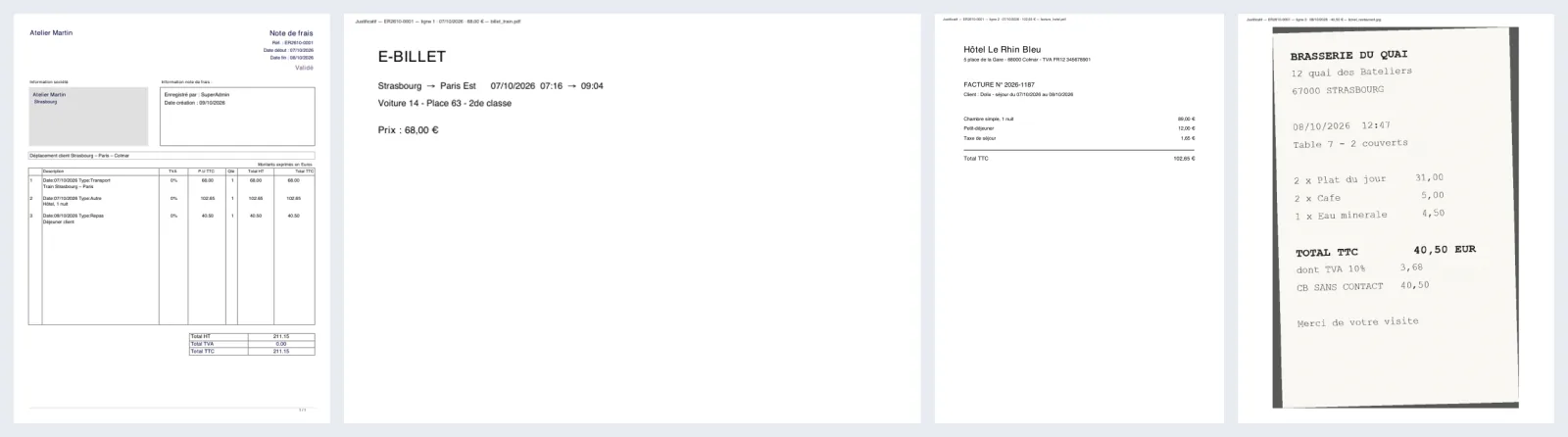
Receipts (photos, PDF) appended to the expense report PDF, page by page. One single document to hand over.
|
|
More info...
In Dolibarr, each expense report line can be linked to a receipt, but the report PDF only contains the table of expenses: receipts stay apart and must be downloaded one by one.
Receipts in expense reports appends the receipts after the PDF, in line order, then (option) the other files uploaded on the report:
- JPG, PNG, GIF photos straightened according to the phone orientation and fitted to the page;
- PDFs added page by page, in their own format (portrait, landscape);
- a marker on each page: report reference, line, date, amount, file name.
A receipt never blocks the expense report: each file is checked before reading (format, size, complete PDF, non-encrypted PDF), merging is written separately, and files left out are listed on a last page with the reason. Up to version 23, Dolibarr's PDF library stops PHP on some damaged PDFs: the module protects against it, sets the file aside and explains it instead of a blank page.
Nothing is changed in your expense reports or files: only the produced PDF is completed. No table created. Compatible with Dolibarr 19 to 24. Written by Dolix (dolix.fr).
Tested on Dolibarr 19.0.4, 20.0.4, 21.0.4, 22.0.5, 23.0.4, 24.0.1 and 24.0.2, with PHP 8.2; syntax checked with PHP 7.4, 8.3 and 8.4.
Limitations and exclusions
- Accepted formats: PDF, JPG, PNG and GIF. iPhone HEIC photos, Word documents and other formats are not converted: they are listed as not included.
- A protected (encrypted) PDF is left out, even if it opens without a password. A file over 20 MB is left out (size can be changed in the settings).
- Without the PHP GD extension, only JPEGs are included, as they are. If PDF merging is disabled in Dolibarr (MAIN_DISABLE_TCPDI constant), the PDF is left as is.
- The module does not check that each line has a receipt: a line with no attached file is not reported.
- In the PDF, photos are re-saved as JPEG, 2,400 pixels at most on the longest side; the uploaded file is not changed.
Support: included / not included
Included
- Email reply from support@dolix.fr, in French, English or German, within two working days.
- Help with installation or activation errors, behaviour that differs from this page, and questions on how to use it.
- Fixes for bugs reproduced on a Dolibarr version covered by this page, shipped in a new version of the module.
Not included
- Installation or setup done for you, training, custom development.
- Problems in Dolibarr itself or in other modules: an opinion and a lead when possible, with no commitment to a result.
- On-call service: no evening or weekend cover.
- Orders, invoices and refunds: handled by the DoliStore.
Online demo
Try the module without installing anything: demo.dolix.fr/. Login demo, password demo. Sample data, reset every night. The demo is in French; the module's button is in the « Modules Dolix à essayer » box on the home page.
Documentation (installation, settings, FAQ, version history): dolix.fr/en/modules/justificatifs-notes-de-frais
If you think this module is a fork of another one (published after the first one) or violates some terms or conditions of use (for users or vendors), you can make a report at dolistore@dolibarr.org