
No products
* Prices may vary depending on your country.
* An additional contribution can be added at the time of payment.
Product successfully added to your shopping cart
There are 0 items in your cart. There is 1 item in your cart.
Product successfully added to your shopping cart
There are 0 items in your cart. There is 1 item in your cart.
New products
-
MBI Propale History
MBI Propale History turns the successive revisions of a commercial proposal into a single, traceable version history, directly inside Dolibarr.
50.00 € -
Business Directory module
Discover the Business Directory module! It allows you to search for a company within official registers—in France, Switzerland, or the United Kingdom—and create a prospect or primary contact without having to re-enter a single line of data.
190.00 €
Upgrade readiness check
mp25232d20261006123435
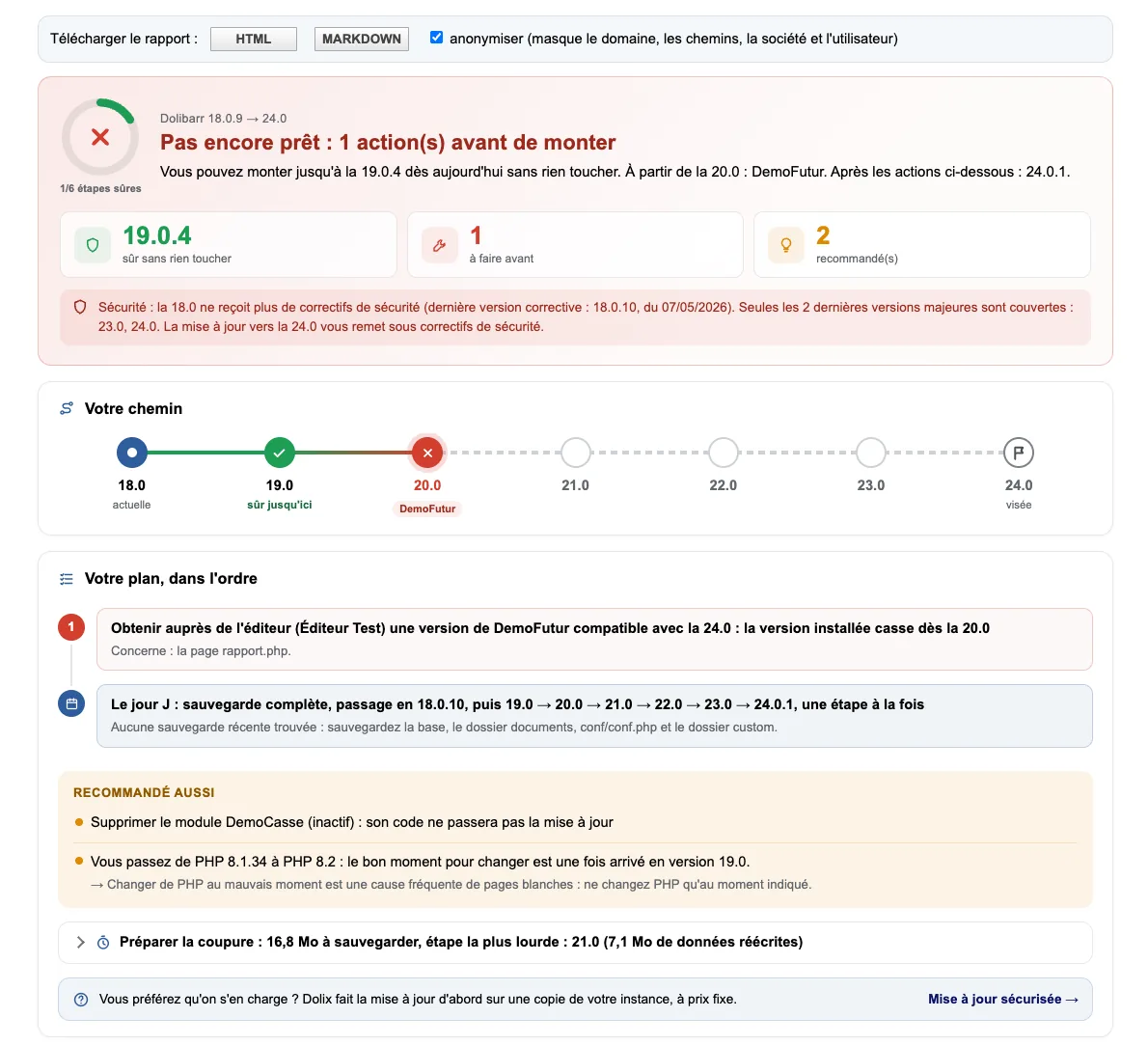
Before upgrading Dolibarr: what will block, what will break and what to do first. Reads the code of your modules. Changes nothing.
|
|
More info...
Hesitant to upgrade Dolibarr for fear of breaking everything? Choose the target version: this module checks your installation without changing anything and gives you a clear report: how far you can go without changing anything, what would break, and an action plan in order.
What is checked:
• The code of your external modules, read file by file against the changes of each Dolibarr version: removed functions, classes and files, methods that became incompatible, functions removed from PHP… with the file, the line, the version where it breaks and the replacement.
• The PHP version at every step, and the right moment to switch.
• The database: mixed encodings, MyISAM tables, server version.
• Enabled core modules that disappear.
• Modified core files (your customisations that will be overwritten), missing or extra files.
• Computed fields Dolibarr will refuse from 23, the unalterable log key for 24, backups, the install lock…
And also: whether your version still receives security fixes, what to back up and which step will rewrite the most data, and for each problematic module, a one-click report to send to its publisher (files, lines, known fix, nothing about your company).
Measured reliability: on 45 real modules actually upgraded up to 24, all 10 fatal errors encountered had been announced.
On-screen report, downloadable as HTML or Markdown (can be anonymised, ready to paste on the forum). Dolibarr 16 to 24, MySQL/MariaDB and PostgreSQL, PHP 7.0 to 8.5. French, English, German. Administrators only.
Network: the module connects to nothing, unless you tick "Integrity of core files": it then downloads the official signature of your version from dolibarr.org, as Dolibarr itself does.
This report reduces known risks; it does not guarantee that an upgrade will succeed: always make a full backup and, if possible, test on a copy first.
Free tested guide: upgrading Dolibarr without breaking it.
Tested on Dolibarr 19.0.4, 20.0.4, 21.0.4, 22.0.5, 23.0.4, 24.0.1 and 24.0.2, with PHP 8.2; syntax checked with PHP 7.4, 8.3 and 8.4.
Limitations and exclusions
- The module does not perform the upgrade: it runs no command and writes nothing to the database or the files. It reads your installation and returns a report.
- Target versions: the major versions known to its data, up to 24.0 (data as of 14/10/2026). On a 24, no target version is offered; a newer version needs a new version of the module.
- The code of modules is read without being run. Encrypted code (ionCube, SourceGuardian, Zend Guard) cannot be checked: a coverage rate shows this for each module.
- Limited duration: 60 seconds in total for the code analysis, 30 seconds at most per module. Files over 2 MB and the vendor, node_modules and includes folders are not analysed; the report shows how many files were not read.
- Backups: the module only looks at the most recent file in the documents/admin/backup folder. It does not check that it can be restored, and does not see a backup made elsewhere, at your host for example.
Documentation (installation, settings, FAQ, version history): dolix.fr/en/modules/pret-pour-la-mise-a-jour
If you think this module is a fork of another one (published after the first one) or violates some terms or conditions of use (for users or vendors), you can make a report at dolistore@dolibarr.org