
No products
* Prices may vary depending on your country.
* An additional contribution can be added at the time of payment.
Product successfully added to your shopping cart
There are 0 items in your cart. There is 1 item in your cart.
Product successfully added to your shopping cart
There are 0 items in your cart. There is 1 item in your cart.
New products
-
NextStock — Advanced warehouse & barcodes
Dolibarr tells you how many items you have. It does not tell you where they are, which batch expires first, in which order to walk the warehouse, or what must be ordered today to be delivered on time.
99.00 € -
Employee Training Management for Dolibarr
Run the whole training lifecycle of your staff in Dolibarr: training application, approval by the manager and the training officer, generation of employee trainings, planning in your training centers and classrooms, trainers, project tasks, evaluation and certificates. A clear, traceable process fully integrated with your users, groups and projects.
249.00 €
Receipts in expense reports
mp25232d20261009215802
New
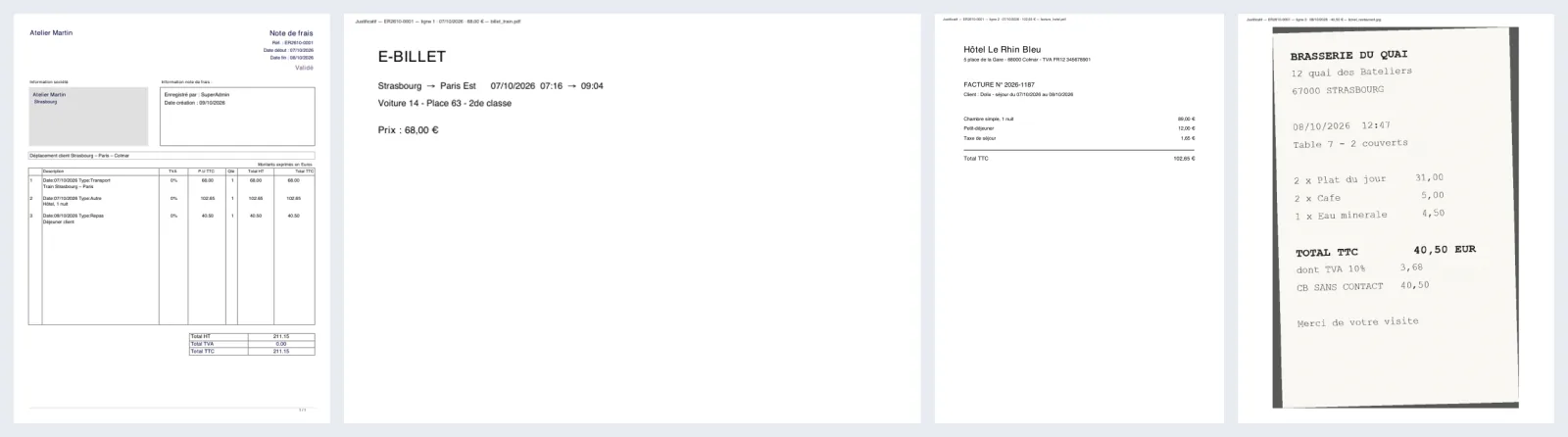
Receipts (photos, PDF) appended to the expense report PDF, page by page. One single document to hand over.
|
|
More info...
In Dolibarr, each expense report line can be linked to a receipt, but the report PDF only contains the table of expenses: receipts stay apart and must be downloaded one by one.
Receipts in expense reports appends the receipts after the PDF, in line order, then (option) the other files uploaded on the report:
- JPG, PNG, GIF photos straightened according to the phone orientation and fitted to the page;
- PDFs added page by page, in their own format (portrait, landscape);
- a marker on each page: report reference, line, date, amount, file name.
A receipt never blocks the expense report: each file is checked before reading (format, size, complete PDF, non-encrypted PDF), merging is written separately, and files left out are listed on a last page with the reason. Up to version 23, Dolibarr's PDF library stops PHP on some damaged PDFs: the module protects against it, sets the file aside and explains it instead of a blank page.
Nothing is changed in your expense reports or files: only the produced PDF is completed. No table created. Compatible with Dolibarr 19 to 24. Written and tested by Dolix (dolix.fr).
If you think this module is a fork of another one (published after the first one) or violates some terms or conditions of use (for users or vendors), you can make a report at dolistore@dolibarr.org