
No products
* Prices may vary depending on your country.
* An additional contribution can be added at the time of payment.
Product successfully added to your shopping cart
There are 0 items in your cart. There is 1 item in your cart.
Product successfully added to your shopping cart
There are 0 items in your cart. There is 1 item in your cart.
New products
-
capcompta - Prototype of an expert interface for accountants 1.3.0
For accountants: an expert keyboard interface, at the level of dedicated accounting firm software, native to Dolibarr.
150.00 € -
Lead Management
The Lead Management module allows you to track commercial contacts to be qualified in Dolibarr without cluttering your third-party database, and then convert them in one click into a prospect, contact, and opportunity — all linked together and to their original lead.
190.00 €
MBI Theme 19+
c21129d20210728154145
A modern theme for Dolibarr which adds different styles to the different elements of the pages (graphics, tables, icons) with a menu on the left side.
|
|
More info...
🎯 Module Overview
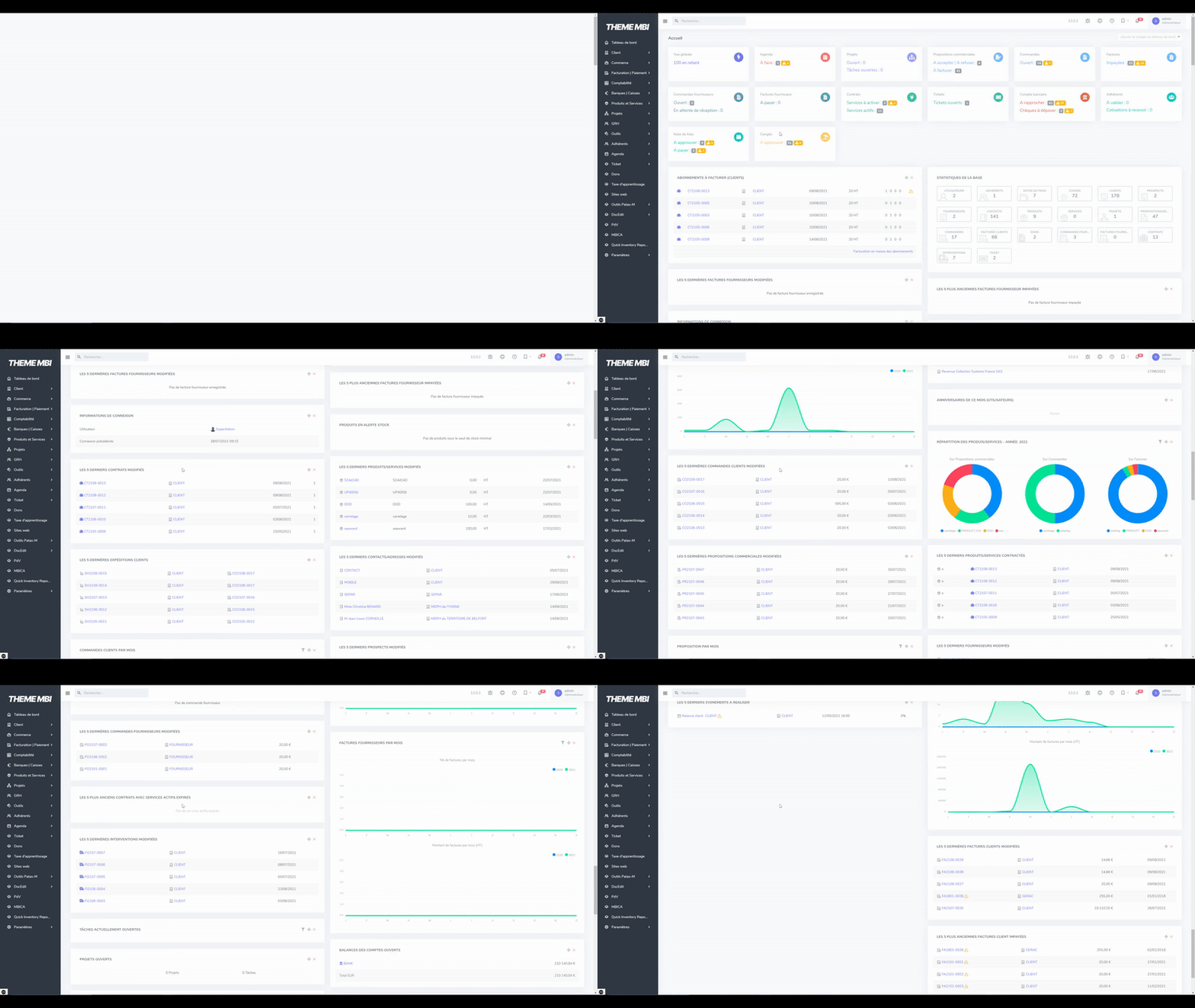
Theme MBI is a modern, full-featured theme for Dolibarr, based on Bootstrap 5, that fully modernizes the interface while keeping Dolibarr's usability. It replaces the standard look with a clean, professional design (top bar, left menu, lists, record pages, dashboard) without changing Dolibarr's business logic. It is in production for many customers.
The theme is made of two inseparable parts:
- a theme (in htdocs/theme/mbi) that provides the visual rendering (CSS);
- a module (themembi, in htdocs/custom/themembi) that drives the menu handler, the login template, the interface transformations, and automatically activates the theme.
🧭 Benefits
- A modern, clear and professional interface, with no need to relearn Dolibarr.
- Better readability of lists, record pages and dashboards.
- A consistent experience across all Dolibarr modules.
- One-click activation: the module automatically activates and forces the theme.
⚙️ Features
- Full Bootstrap 5 interface: top bar, collapsible left menu, reworked lists, record pages and forms.
- Modernized dashboard: restyled info-boxes and widgets, charts rendered with ApexCharts.
- Top search bar with category targeting.
- Notifications dropdown (the user's latest agenda events).
- Built-in breadcrumb to quickly find recently visited items.
- Bookmarks dropdown and quick access.
- Dark mode support (THEME_DARKMODEENABLED option).
- Custom login page.
- Multicompany compatible (entity selector in the top menu).
- Responsive display adapted to different screen resolutions.
✅ Compatibility
- Dolibarr: 19 to 23
- PHP: 7.1 or higher (depending on the Dolibarr version in use)
- Designed to integrate with the standard Dolibarr interface
🔧 Installation
The MBI theme is made of two parts:
- a theme (to be placed in htdocs/theme/)
- a module (to be placed in htdocs/custom/)
Both are required for the theme to work properly.
- Copy the content of htdocs into your Dolibarr htdocs folder (the mbi theme goes into htdocs/theme/, the themembi module into htdocs/custom/).
- Go to Home > Setup > Modules/Applications.
- Activate the Theme MBI module. The module automatically activates and forces the theme.
⚠️ Warning:
- Activating the theme without the module will cause display bugs.
- Changing the Dolibarr theme once the module is activated may also cause display bugs.
📄 End-user License Agreement
The Theme MBI module is edited by MB Informatique SARL (SIRET: 83434236200029), whose head office is located at 120 rue de l'île Napoléon 68170 Rixheim FRANCE - Tel.: 03 67 262 242. This End-user License Agreement legally frames the use of the services of the Theme MBI module.
MB Informatique SARL declines all responsibility for any viruses that may infect the User's computer equipment after use or access to this module.
The total guarantee of data security, integrity, and confidentiality, whatever it may be, is not guaranteed by MB Informatique SARL.
MB Informatique SARL cannot be held responsible for its use outside the legal framework.
This contract is valid for an indefinite period. The beginning of the use of the module's services marks the application of the contract with regard to the User.
👨 Publisher
Theme MBI is a custom Dolibarr theme developed by MB Informatique.
It was designed for organizations that want a modern, pleasant and professional Dolibarr interface, without giving up Dolibarr's standard features and usability.
Publisher: MB Informatique
Contact: info@mb-informatique.fr
Website: https://www.mb-informatique.fr
Module version: auto
Publisher/Licence: MB Informatique / GPL-v3
User interface language: English, French
Help/Support: MB Informatique
Prerequisites:
- Dolibarr min version: 19.0.0
- Dolibarr max version: 23.0.x
💻 CHANGELOG
UPDATE 2.5.0 (2026-10-12)
- Improved: lighter pages: the main script of the theme (about 60 KB) is now kept in the cache of the browser instead of being sent again with every page, and the dark mode style sheet is 46% lighter (71% once compressed).
- Improved: the third-party components included in the module are listed with their licence in THIRD-PARTY-NOTICES.md, with the texts of these licences in the licenses folder; article 3 of the terms of use states that they remain under their own licence.
UPDATE 2.4.9 (2026-10-12)
- New: the setup page of the module warns when the installed mbi theme folder is older than the one delivered with the module (the deployment tab of Dolibarr only updates the module; the theme folder is copied by hand).
- Improved: when the MBI Breadcrumb module is enabled, the theme no longer shows its own breadcrumb trail as well (the setup page says so).
- Fixed: the thumbnail of the theme is no longer distorted in Home > Setup > Display.
- Improved: the module is about 5 MB lighter: the fonts meant for Internet Explorer and the style sheets that nothing used are no longer delivered.
- Improved: the setup and About pages carry the name of the theme, the breadcrumb option says that the trail is shown on screens more than 1600 pixels wide, and a few wordings are corrected.
- Improved: the documentation is also shown in French, German, Spanish or Italian for the regional variants (Belgium, Switzerland, Canada...): the README files are renamed README-fr.md, README-de.md, README-es.md and README-it.md. After a manual update by copy, delete the former README-fr_FR.md, README-de_DE.md, README-es_ES.md and README-it_IT.md files.
UPDATE 2.4.8 (2026-10-12)
- Fixed: the Documents section of the left menu shows its icon in every language (it was missing in German, Spanish and Italian).
- Improved: after an update of the theme, the browsers load its new style sheet from the next page, instead of keeping the former one for up to 3 hours.
- Improved: a search from the top bar in the tickets, the payments, the expense reports or the leaves opens the matching section of the left menu.
- Security: hardening aligned with Dolibarr: the logout link carries a security token (and, as in Dolibarr, logging out is not offered with the HTTP authentication), the links opened in a new tab are isolated, the print view no longer replays a mass action, and the scripts of the theme carry the security nonce.
- Improved: in multi-company, switching entity keeps the filters of the page intact (accents and spaces were damaged).
- Improved: a database error of the notifications is reported as an error instead of "You're up to date", the module no longer creates an empty documents/themembi/temp folder nor writes a warning in the log at each activation, and unused code is removed.
UPDATE 2.4.7 (2026-10-08)
- Fixed: the "Journals" menu of accountancy follows the standard menu of each Dolibarr version: the "Miscellaneous operations" journal is shown again, and in cash accounting (Dolibarr 22 and later) only the bank journal is offered, as in the standard menu.
- Improved: a failed save (read marker of the notifications, light or dark mode of a user, settings of the module) is now written to the Dolibarr log (Debug Logs module), and notifications that could not be marked as read no longer disappear from the list as if it had worked.
- Improved: the browser console no longer shows a debug message at each search, and the error messages of the notifications are in English.
- Improved: every source file of the module and of the theme carries its copyright and licence notice (GNU GPL v3 or later), and the mbi theme folder now contains the licence text (COPYING file).
UPDATE 2.4.6 (2026-10-08)
- Improved: about half as much JavaScript is loaded on each page (about 1 MB instead of 2.1 MB): the libraries that nothing used are removed, and a single bundle serves every language.
- Security: moment.js 2.27.0 and highlight.js 9.16.2, unused but flagged by the vulnerability scanners, are no longer delivered.
- Improved: the date fields show the calendar in the user's language, with the right format, as soon as the page is displayed, in every language.
- Improved: the notifications no longer read the whole agenda table on each page, and the read marker of each user is no longer stored among the global settings (it is moved automatically).
- Improved: long lists are displayed faster (the tooltips are created when hovered), and the top bar no longer repeats needless computations on each page.
UPDATE 2.4.5 (2026-10-08)
- Improved: disabling the module gives back the theme used before its activation, instead of Dolibarr's default theme.
- Improved: the settings left in the database by the versions up to 1.3.0 (among them the list of the records opened by all users) are removed.
- Fixed: the "Clear" button of the notifications and the "About" tab show the wording of the module in every language (the Italian interface showed them in English), and the cash control entry of the menu shows its translated name instead of "POS".
- Improved: the documentation describes the complete removal (disable the module first), the reactivation needed when upgrading from a version earlier than 2.0.0, who sets each display option, the notifications, the breadcrumb trail, and the menu paths of Dolibarr in German, Spanish and Italian.
UPDATE 2.4.4 (2026-10-08)
- Fixed: the pictos placed before the fields have a fixed width, as in the standard theme: the fields of the forms are aligned again.
- Fixed: in the kanban views, the cards have the same width, the checkbox is on the right and labels that are too long are cut.
- Fixed: the "Link to…" menus and the column selector placed on the right open inside the screen, and the breadcrumb trail no longer goes beyond the right edge of large screens.
- Fixed: printed pages no longer start with a blank band, nor do the popup windows of Dolibarr.
- Fixed: the rows and fields that Dolibarr hides are hidden again, star ratings are coloured, and the "Read more" of the messaging view no longer shows the text twice.
- Fixed: on phones, password fields use the full width; in Arabic and Persian, the content no longer goes under the menu; the setup pages of the module no longer show a broken image.
- Improved: a search icon gives access to the global search on tablets and phones, and the keyboard focus is visible on links and buttons.
- Improved: in dark mode, buttons stay readable when hovered, the Gantt chart, the nature badges of the third parties and the secondary texts are readable, pages print as in light mode and the point of sale (TakePOS) stays light.
- Compatibility: the dark mode option of the standard theme, which gave a half dark display with this theme, is no longer applied: use the dark mode of the module.
UPDATE 2.4.3 (2026-10-08)
- Fixed: the left menu no longer shows empty sections to users who have no right in them, and the sections of the modules follow the rights of the user and, for external users, the modules opened to them, as the top menu of the standard theme.
- Fixed: the statistics of products and services are displayed without the Commercial proposals module, and the supplier entries also accept the rights of the new supplier modules.
- Fixed: the menu entries that open in a new tab (Pad, Module Builder, Point of sale…) do so again, and an entry without link no longer leads to the home page.
- Fixed: on installations at the root of the domain, the sections of the left menu no longer start with a useless link.
- Fixed: the search field of the bookmarks filters the list.
- Fixed: in dark mode, the WYSIWYG editor stays dark after switching to the source code view.
- Fixed: the confirmation of a new password and the confirmation that a reset request was sent are no longer displayed as errors, and the first one no longer shows a technical code.
- Fixed: the custom HTML footer and the Google Analytics tag are no longer printed twice on the login page.
- Improved: the controls that modules place in the tab bar of the cards keep working, and closing a tooltip with the keyboard no longer causes errors in the browser.
UPDATE 2.4.2 (2026-10-08)
- Fixed: "New shipment" and "New reception" open the creation page again, and the cash control and leave links follow the installed Dolibarr version.
- Fixed: the buttons of the confirmation boxes opened after the page has loaded are styled, and the tooltip that explains why an action button is refused is displayed again.
- Fixed: language and country flags are displayed, and the selector of e-mail layouts is styled.
- Fixed: from Dolibarr 21, the "Password forgotten" page uses the layout of the theme again, including the captchas provided by modules.
- Improved: the background image or style of the login page set in the display setup of Dolibarr is applied.
- Improved: the scripts of the theme are no longer loaded on public pages (online payment, online signature…) and are refreshed after each update.
- Improved: modules can reorganise the left menu as with the standard menu, and a missing file of a third-party module no longer blocks the pages.
- Compatibility: older tablets (iOS 12 to 14.4) can use the theme, hover tooltips are no longer set on phones and tablets, and the theme no longer relies on functions that Dolibarr is removing.
- Compatibility: the web application (home screen of a phone) uses the title and logo set in Dolibarr, and the WYSIWYG editor follows the settings of the standard theme.
UPDATE 2.4.1 (2026-10-08)
- Security: the dark mode switch of the top bar and the notifications follow the anti-CSRF protection of Dolibarr: a link from another site can no longer change the display mode or mark the notifications as read.
- Security: external users only see the menu sections of the modules allowed to them (MAIN_MODULES_FOR_EXTERNAL), as with the standard Dolibarr menu.
- Security: the bookmarks menu is only shown with the Bookmarks & Shortcuts module and the permission to read them, and the Dolibarr version is hidden when the MAIN_HIDE_VERSION option is set.
- Security: the texts and graph labels that come from the data are displayed as text and can no longer be interpreted as HTML.
- Security: the notification service only answers when the module is enabled, with the security headers of Dolibarr, and the script of the theme can no longer be called directly.
UPDATE 2.4.0 (2026-10-08)
- Improved: the breadcrumb trail no longer reloads every record it shows on each page, which makes all pages faster; a record changed elsewhere may take up to 5 minutes to show its new name in the trail.
- Improved: the mbi theme is imposed on every user, as the menu of the module needs it: a user who had chosen another theme in their display preferences got an unusable screen. The "theme forced" notice of Dolibarr appears once the module has been disabled and enabled again.
- Security: the values that Dolibarr hides on screen (LDAP password, API key…) are no longer displayed in clear.
- Fixed: with the "Disable JavaScript and Ajax functions" display option, pages no longer stay behind the loading screen.
- Fixed: a page whose graphs have labels with apostrophes or colons, or which contains data of another module, no longer stays blocked; the graphs of bank accounts are displayed and the graphs of the home page take the full width of their column.
- Fixed: the home page no longer scrolls horizontally when a widget is wider than its column.
- Fixed: the empty list above the buying price in the line form of documents is no longer shown before a product is chosen.
- Fixed: the keyboard focus can leave the top search field with Tab, the "Create" menu opens downwards when it would go under the top bar, and on phones the list of the tabs grouped under "…" (Notes, Linked files…) stays on screen.
- Fixed: the "Excluded" status of members and the "Refused" status of job applications are visible again, and the chart of unpaid invoices shows all its colours.
- Improved: unused files of the graphic template are no longer shipped.
UPDATE 2.3.0 (2026-10-08)
- New: login with OpenID Connect, with automatic redirection when it is the only login method, and with Google, as on the standard Dolibarr login page.
- New: the left menu offers the entries of recent Dolibarr versions that were missing: order lines, supplier invoice templates, payments of donations, VAT, salaries and expense reports, accounting export, result by project, stock transfers, time spent list, skills management, collective leave, custom reports (BI) and excluded members.
- Improved: the entries that modules add to the standard menus now appear in the right section, the sub-menus of each module are no longer mixed up, and a module without side menu entries (point of sale…) can be opened from the menu again.
- Improved: the menu follows the Dolibarr options that hide or change entries (e-mail templates, supplier invoices, stock of services, time entry page, landing page, statistics restricted to the export permission) and no longer depends on the experimental features level.
- Improved: the blocks and buttons that other modules add to the side menu and to the top bar are now displayed.
- Security: the multi-company entity selector is only shown to the users allowed to switch entity.
- Fixed: the Tickets menu is translated and follows user permissions, and links such as "Billable orders", contract services, leave requests or salary payments open the right filtered list.
- Fixed: the breadcrumb trail shows the right record, and the "Add" button of the bookmarks now records the current page.
- Fixed: a captcha provided by a module (reCAPTCHA…) is displayed on the login page, and the login field takes the full width, like the password field.
- Fixed: the menu of the DoliDroid Android application is no longer empty.
UPDATE 2.2.0 (2026-10-07)
- Improved: the module now refuses to activate when its theme folder is missing, instead of leaving Dolibarr without any styling; in a multi-company setup, disabling it no longer changes the theme of the main company.
- Security: the breadcrumb trail no longer shows records the user is not allowed to view, and an unused former search endpoint has been removed.
- Fixed: dates picked in the calendar are saved correctly in every language (day and month could be swapped).
- Fixed: the Kanban view of lists shows its cards again, and pages without a side menu (website editor, collaboration, pop-up windows) no longer stay hidden behind the loading screen.
- Fixed: on phones, the side menu closes again and the top bar fits the screen.
- Fixed: confirmation boxes show their title again, tab counters are visible again and action buttons are no longer split in two.
- Fixed: in dark mode, action buttons and ticket status buttons are readable.
- Fixed: external users (customer or supplier portal) no longer get an error when the Projects module is enabled.
- Fixed: logging in from an expired link no longer loops back to the login page, and the Exports menu entry and other menu links lead to the right page again.
- Compatibility: the module now appears in the "MB Informatique" family of the modules list, and the theme style sheet has been fixed for PHP 8.
UPDATE 2.1.0 (2026-09-09)
- New: full dark mode covering the whole interface, disabled by default and enabled from the module setup.
- New: each user switches between light and dark display from the top bar; their choice is remembered.
- New: administrators can impose the dark mode on all users (together with the dark mode option).
- Improved: the dark mode applies as soon as the page appears, with no transient light background.
- Compatibility: public pages and printing deliberately remain in light display.
UPDATE 2.0.0 (2026-06-25)
- ⚠️ Action required: disable then re-enable the module after updating to apply the changes introduced by this version.
- New: three display options available in the setup — striped list rows, bordered tables and breadcrumb trail.
- New: the breadcrumb trail covers the main business records (third parties, contacts, sales and purchase documents, products, projects, contracts, shipments, interventions, members, tickets), highlights the record being viewed and is cleared in one click.
- Improved: more readable lists — horizontal scrolling restored, headers set apart and search filters recentred.
- Improved: cleaner left menu — duplicate entries hidden, Third parties home link added, scrolling down to the last menu.
- Improved: pages are displayed faster.
- Security: fixed flaws allowing data to be viewed or content to be injected into pages.
- Fixed: the top search did not filter lists, and the "More..." tab no longer opened its list of tabs.
- Fixed: tooltips, close buttons, the "Create" menu, the third-party form and the multilingual calendar work correctly again.
- Compatibility: support for Dolibarr 19 to 23 and PHP 7.1 to 8.2.
UPDATE 1.2.4 (2026-02-10)
- Compatibility: support for the Kanprospects module.
UPDATE 1.2.3 (2025-12-09)
- New: company selector in the top bar for multi-company installations.
UPDATE 1.2.2 (2025-06-27)
- Improved: internal optimisations and code cleanup.
UPDATE 1.2.1 (2022-03-23)
- Improved: chart library updated.
UPDATE 1.0
- New: initial version of the theme.
If you think this module is a fork of another one (published after the first one) or violates some terms or conditions of use (for users or vendors), you can make a report at dolistore@dolibarr.org