
No products
* Prices may vary depending on your country.
* An additional contribution can be added at the time of payment.
Product successfully added to your shopping cart
There are 0 items in your cart. There is 1 item in your cart.
Product successfully added to your shopping cart
There are 0 items in your cart. There is 1 item in your cart.
New products
-
Remaining to bill
Shows what remains to be invoiced (unbilled amounts) on each customer order, line by line: partial invoices, down payments, credit notes, grouped invoices.
39.00 € -
CHCheckTime — Stopwatch time tracking on tickets, tasks & interventions
Floating stopwatch on tickets, project tasks, interventions and third-party cards — one click saves time as an intervention line or task time.
25.00 €
Dolix Caisse – TakePOS look: modern till layout and trade themes
mp25232d20261018201251
New
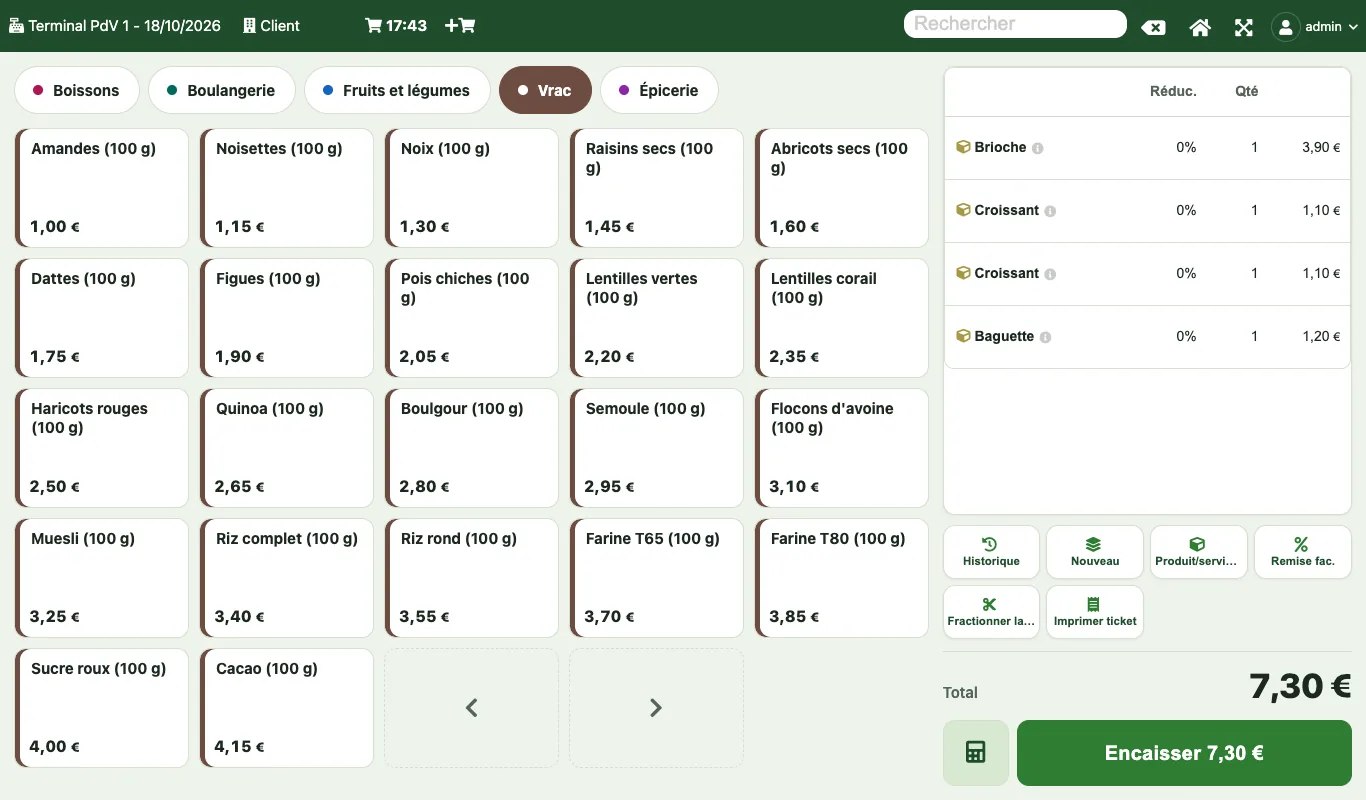
Make TakePOS look like a modern till: category tabs, large product grid, basket on the right, Charge button, trade themes or your logo colours.
|
|
More info...
TakePOS works well, but its screen looks dated: small boxes, a crossed-out camera on every product without a picture, half of the screen empty. This module gives it the look of a modern till, without changing how it works.
- Modern till layout: category tabs at the top, large product grid (name at the top, price at the bottom), basket on the right, full height.
- "Charge 7.30 €" button at the bottom right. It is disabled when the basket is empty, shows the remaining amount after a partial payment and becomes "New sale" once paid.
- Keypad on demand: it opens with the calculator button or when you tap a basket line (quantity, price, discount).
- 4 trade themes: Grocery, Bakery, Bar-café (dark), Boutique. Or your logo colours, picked automatically.
- Readable products without pictures: the name replaces the crossed-out camera. Each category has its colour, also shown on its products. Products with a picture keep it.
- Payment screen in the same colours.
- Bars and restaurants: the floor plan takes the same colours, with each table shown "Free" or "Occupied" at a glance. The bottom button becomes "Tables" when the basket is empty and once paid.
- Big keys (touch screens) and high contrast options. All text keeps a contrast ratio of at least 4.5:1 (WCAG AA).
- The original layout is still available: you can keep the TakePOS zones and only change the colours.
For whom: grocery stores, bakeries, bars, cafés and restaurants, boutiques, and any shop that sells with TakePOS on a computer or a tablet.
How it works: only the position of the zones changes. Buttons and calculations are still those of TakePOS: sales, payments, receipts and stock are recorded exactly as before. The rest of Dolibarr is unchanged.
Limits: the modern layout applies to screens 900 px wide or more; below that, and on the TakePOS phone screen, only the colours change. The floor plan keeps the layout of your tables: only its look changes. The payment screen and the floor plan need a recent browser (Chrome or Edge 105, Safari 15.4, Firefox 121 or later); otherwise they keep their original look.
No table created, no core file modified, no outside connection. Setup is for administrators only. Tested in the browser on every Dolibarr version from 19 to 24: complete sales up to the paid receipt, Bar Restaurant mode included. Interface in French, English and German. Written and tested by Dolix (dolix.fr).
Support
- Support: support@dolix.fr, in English, French or German.
- Included: 2 years of access to updates and downloads, fixes for reported bugs.
- Not included: installation on your server, training, custom development (quote on request).
- Module interface languages: French, English, German.
All Dolix modules on DoliStore: search "dolix".
Online demo. Try the module without installing anything: demo.dolix.fr/takepos/index.php. Login demo, password demo. Sample data, reset every night. The demo is in French.
Documentation (installation, settings, FAQ, version history): dolix.fr/en/modules/habillage-takepos
If you think this module is a fork of another one (published after the first one) or violates some terms or conditions of use (for users or vendors), you can make a report at dolistore@dolibarr.org