
No products
* Prices may vary depending on your country.
* An additional contribution can be added at the time of payment.
Product successfully added to your shopping cart
There are 0 items in your cart. There is 1 item in your cart.
Product successfully added to your shopping cart
There are 0 items in your cart. There is 1 item in your cart.
New products
-
TakePOS wallet: prepaid balance for customers and members
Customers or members pay in advance; TakePOS spends the balance at each visit until it runs out. Dolibarr accounting stays intact.
79.00 € -
NsClipboardCPButton – Copy the details (ref, email, tel, etc.) with a single click
A copy button at the end of the reference of your proposals, orders, invoices, projects, products… and on the third party card for the name, email, phone and customer code. One click, a tick: it's copied. Enabled object by object.
50.00 €
Tags column in lists
mp25232d20261011235219
New
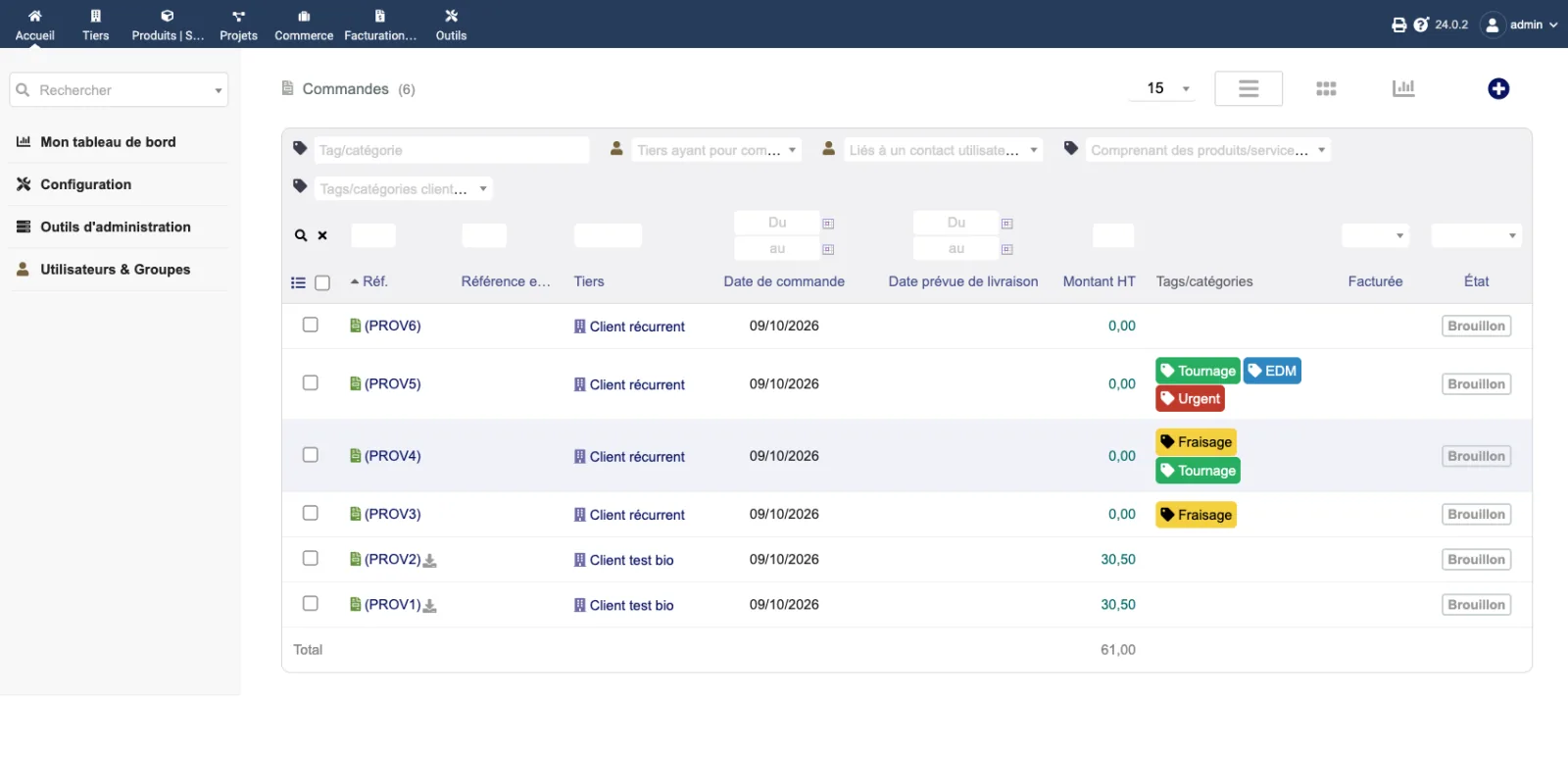
Tags/categories in colour, in a column of your lists: proposals, orders, invoices, third parties, contacts, products, projects.
|
|
More info...
Dolibarr can filter a list by tag, but it does not show tags in the list: to see which tags an order or a customer has, you have to open its card.
This module adds a "Tags/categories" column to Dolibarr's lists:
- commercial proposals, customer orders and invoices;
- supplier orders and invoices;
- third parties (customer and supplier tags), contacts, products and services, projects.
Each tag is shown as a pill, in its own colour, like on the cards, and opens the tag page. Dolibarr's tag filter stays available above each list.
Setup: one checkbox per list. On lists that support it, the column also appears in the column selector, and each user can hide it for themselves.
The module follows your Dolibarr version: tags on orders and invoices exist from V22, on proposals from V23. The column is only shown to users allowed to read tags. Nothing is written to the database and no Dolibarr file is modified.
Compatible with Dolibarr 21 to 24, MariaDB and PostgreSQL. Written and tested by Dolix (dolix.fr).
Online demo. Try the module without installing anything: demo.dolix.fr/commande/list.php. Login demo, password demo. Sample data, reset every night. The demo is in French.
Documentation (installation, settings, FAQ, version history): dolix.fr/en/modules/tags-listes
If you think this module is a fork of another one (published after the first one) or violates some terms or conditions of use (for users or vendors), you can make a report at dolistore@dolibarr.org